A practical attendance system for small businesses: what to get right first
A practical guide to attendance setup, geofencing, selfie evidence, leave, corrections and salary review for small teams.
Attendance software often becomes complicated before it becomes useful. Small businesses are offered shift engines, biometric rules, payroll penalties, dashboards and dozens of settings before the basic daily workflow is trustworthy.
A better starting point is simpler: make attendance easy for employees to mark, difficult to fake casually, easy for the owner to review, and safe to correct without destroying history.
This guide explains the practical choices that matter first.
1. Start with the daily attendance action
The employee-facing flow should be obvious. If staff have to remember whether they are pressing IN, OUT, START or END, errors become part of the process.
Kavit uses one Punch / Mark Attendance action. On a shared office device, the employee selects their name, the app checks the device and location, captures a live selfie, and sends the attendance event to the server. The server assigns the official time and determines the event sequence.
That gives the employee one simple job: mark attendance.
It also means the server—not the employee’s phone clock—remains the source of truth for the punch time.
Why this matters
A good attendance system should reduce these common errors:
- an employee pressing OUT when they meant IN;
- duplicate taps creating duplicate records;
- staff changing the phone clock;
- an employee selecting another employee on a personal device;
- a network retry creating a second punch.
Kavit uses request protection and also blocks a repeated physical punch for the same employee within a short window.
2. Decide how employees will mark attendance
Not every office needs the same device model. A practical system should support the operating reality of the business.
Shared office device
A shared Android device can stay at the office entrance or another fixed point. Employees do not need individual Kavit application accounts just to mark attendance.
The shared device can show only employees who are eligible to mark attendance through that device. The employee selects their name, completes the location/selfie flow and marks attendance.
This works well for:
- shops and offices with a common entrance;
- teams where employees do not need a company phone;
- businesses that want one controlled attendance point.
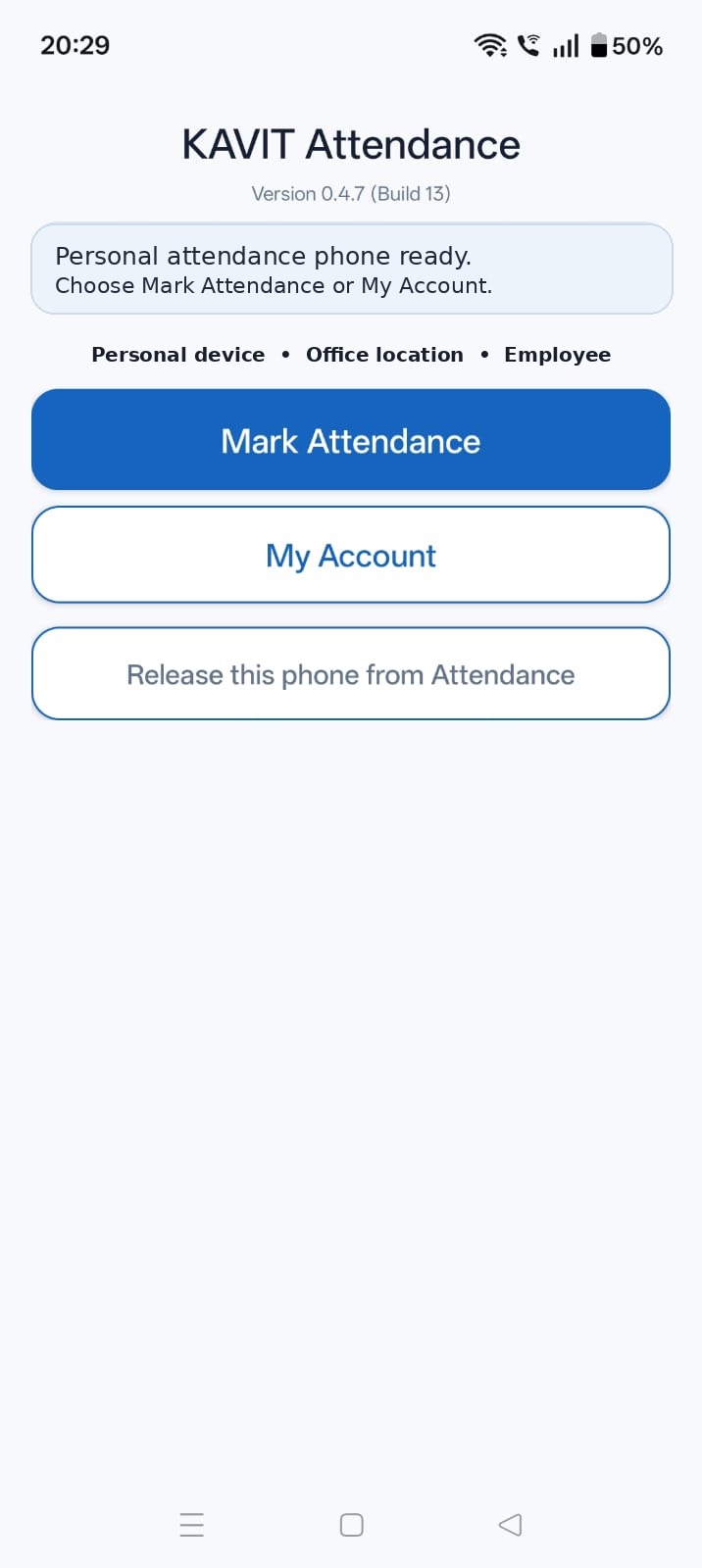
Employee-bound personal mobile
Where the business enables it, a registered personal Android device can be bound to one employee. The backend—not the screen—enforces that employee binding.
That model is useful when:
- an employee may report to more than one approved business location;
- the business operates multiple fixed workplaces; or
- a shared kiosk is not practical for that employee at every approved location.
The important rule is that Personal Mobile attendance should not become an unrestricted “choose anyone and punch” screen. The device must stay tied to the employee it was approved for.
Kavit’s current Personal Mobile attendance is still location-bound: the punch must satisfy the geofence of a configured, approved fixed workplace. It is not positioned as attendance from customer visits or arbitrary roaming locations.
3. Use location as a business rule, not as background tracking
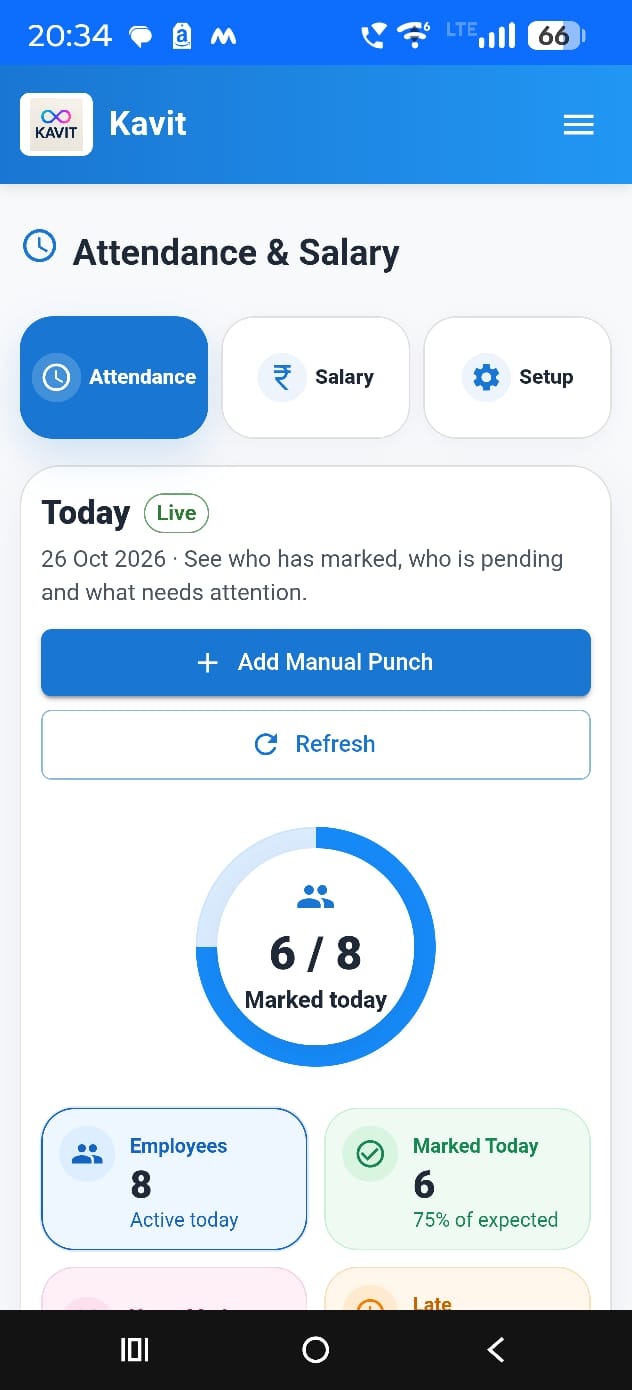
Location checks are useful only when the rule is explicit.
Kavit uses a configured attendance location and allowed radius. The backend calculates whether the attendance event is inside that allowed area. A business may configure a radius such as 150 metres for an office, but the radius is a store/location setting—not a universal value for every business.
For Personal Mobile attendance, the location must be freshly acquired for the event and must satisfy the configured workplace geofence. Ordinary Android framework-marked mock/fake locations are rejected, while server-side geofence validation remains mandatory.
Just as important: continuous background tracking is not required. The system needs location for the attendance security event; it does not need to follow the employee throughout the day.
A practical geofence checklist
Before enabling attendance for a location:
- stand at the actual attendance point;
- verify GPS quality on the device that will be used;
- configure a radius suitable for the physical site;
- test from inside the allowed area;
- test from clearly outside it;
- verify the failure message is understandable to employees.
A geofence that is too tight creates false failures. A geofence that is too wide removes most of its value.
For a deeper location-specific setup guide, see GPS Attendance for Multiple Locations.
4. Treat selfie capture as evidence with a retention limit
A selfie can help an owner verify that the attendance event belongs to the person who marked it. But that does not mean the image should be stored forever.
Kavit’s current workforce requirement treats the selfie as private attendance evidence. It is retained for 40 days, then the image is deleted while the attendance history remains.
That distinction is important:
- attendance history is an operational record;
- the selfie is temporary supporting evidence;
- deleting the selfie later should not erase the attendance day;
- retained selfie viewing should remain authenticated/private.
The current release does not require face recognition or liveness matching. Those are separate future decisions with additional consent, enrollment and security considerations.
5. Keep leave connected to attendance
Attendance becomes much more useful when approved leave is part of the same picture.
A practical leave flow should allow an employee to request leave while keeping approval with the employer. In Kavit, Employee Self Service can expose an Apply Leave workflow through a PIN-protected employee area when the store enables it.
The employee can request:
- a date or date range;
- full day or half day;
- a reason.
The employee does not decide whether the leave is paid or unpaid. That classification belongs to the admin during approval.
Only approved leave should influence attendance and salary calculations. Pending leave is still pending—it should not quietly change payroll.
6. Employee self-service should be useful, but controlled
Self-service is most valuable when it answers the questions employees ask repeatedly without giving away administrative control.
Kavit can make these employee-facing modules available through PIN-protected self-service:
- My Attendance;
- Apply Leave;
- My Leave Requests / Status;
- Holiday List;
- My Salary / Payslips where enabled;
- Break Tracking on eligible personal devices where enabled.
An employee can view their own attendance, but cannot silently rewrite it. Attendance correction remains an admin operation.
That separation is important. Visibility for the employee; authority for the employer.
7. Preserve history when attendance needs correction
Every real business eventually needs to correct attendance. Someone forgets a punch. A device has a problem. An admin adds a valid missed event.
The dangerous approach is to simply overwrite the old record.
A better approach preserves the original event and records the correction or exclusion as part of the audit history. That makes it possible to understand what actually happened later.
Kavit’s attendance design follows that principle. Manual corrections and exclusions are audit-preserving rather than destructive historical edits.
This becomes especially important once a salary period is finalized. Payroll-related history should not be casually rewritten after the fact.
8. Separate attendance facts from salary policy
Attendance can provide the facts needed for salary, but an attendance app should not invent the employer’s payroll policy.
For example, Kavit records Late/Early information as factual attendance intelligence. It does not automatically turn every late arrival into a salary penalty.
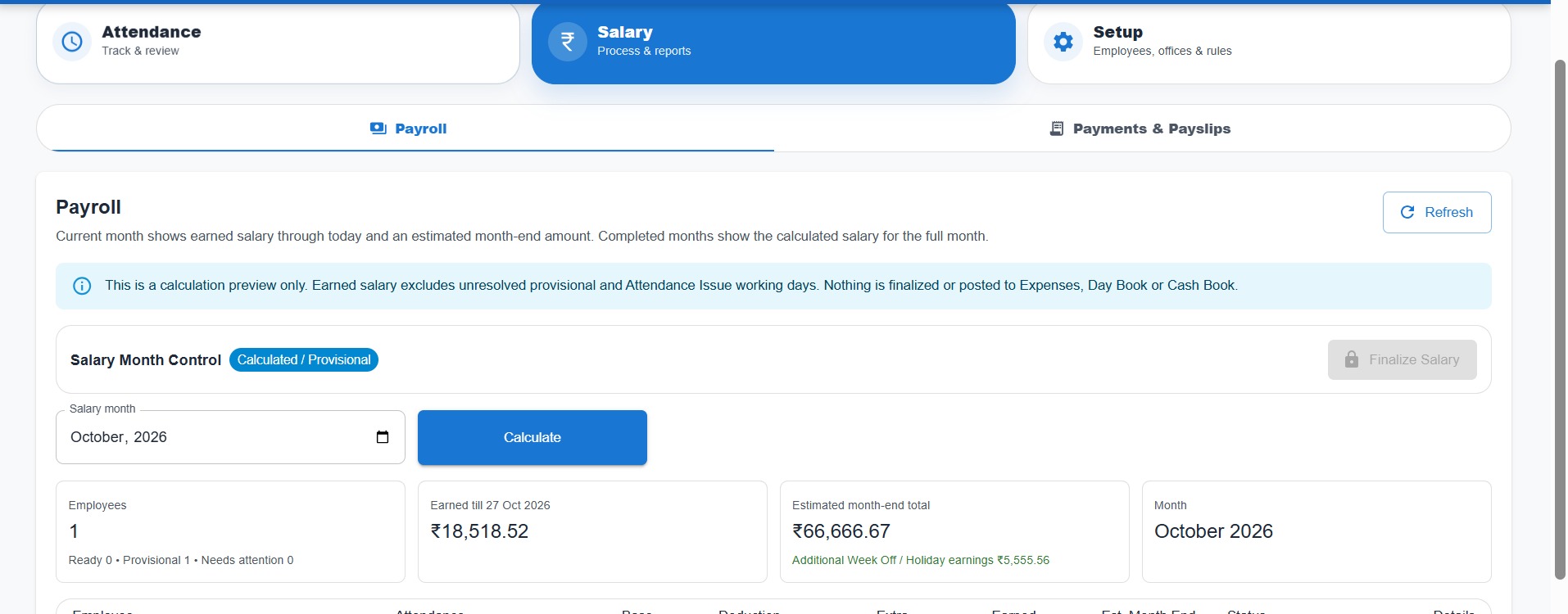
Suggested salary can use reviewed attendance, approved paid/unpaid leave and configured salary rules. The employer can inspect the result before finalizing the salary period.
This is a healthier design than allowing an opaque rule to silently reduce an employee’s pay.
What the owner should review before finalizing salary
At minimum, review:
- missing/single punches;
- approved and pending leave;
- unusual attendance durations;
- employee joining/leaving dates;
- Week Off/Holiday work where applicable;
- any manual attendance corrections.
The salary number should be explainable from the underlying records.
If you are evaluating the wider software workflow, read Attendance Software for Small Business in India.
9. Do not confuse break tracking with attendance
For businesses that need it, break tracking can be useful. But it should remain a separate concept.
In Kavit, Break Tracking is an optional Personal Mobile Employee Self Service feature. It can record Start Break and End Break events, but break minutes do not currently alter Full Day/Half Day/Absent classification or suggested salary.
That separation avoids turning a simple attendance rollout into a complex time-and-motion system on day one.
10. Plan for the internet requirement
Attendance security checks depend on the server being able to validate the device, store, employee, location and official time. The current Kavit attendance workflow therefore requires connectivity for the attendance event.
An offline device cannot submit attendance in the current release.
For a business evaluating an attendance location, internet reliability should be part of setup—not something discovered on the first busy morning.
11. Roll out attendance in stages
A small team does not need a long implementation project. A practical rollout can be done in a few steps.
Day 1: configure the basics
- Add employees.
- Set employment/joining dates correctly.
- Configure office rules and working days.
- Add the attendance location and geofence.
- Pair the shared attendance device or approve eligible personal devices.
Day 2: test with a small group
Ask two or three employees to mark attendance and verify:
- employee selection/binding;
- location pass/fail;
- selfie capture;
- immediate success/failure message;
- attendance appearing correctly for the admin.
First week: review exceptions daily
Look for:
- missing punches;
- location failures;
- employees struggling with the workflow;
- leave requests not being approved in time;
- device or connectivity problems.
Do not start by creating more rules. First remove friction from the daily process.
First salary cycle: reconcile before finalizing
Use the first salary cycle as an audit of the setup. Check whether attendance, leave, working-day rules and employment dates produce a result the owner can explain.
12. Common mistakes to avoid
Making the employee choose too much
The fewer decisions required at punch time, the better. Attendance is a repetitive action; the UI should be predictable.
Using GPS but validating only on the phone
Client-side checks alone are not enough. The backend should remain authoritative for the geofence decision.
Keeping selfie evidence forever
Evidence needs a defined retention period and controlled access.
Letting employees edit attendance history
Self-service should not become self-approval. Corrections belong to an authorized admin and should preserve audit history.
Turning every exception into an automatic salary deduction
Attendance facts and payroll policy are different things. Record the facts first; apply approved salary rules separately.
Ignoring connectivity during setup
If the attendance location has unreliable data/Wi-Fi, test that before rollout.
Frequently asked questions
Does every employee need a Kavit login?
No. On a shared office attendance device, employees can mark attendance without having an individual Kavit application login. PIN authentication is used for private Employee Self Service functions, not for the normal attendance punch.
Can an employee correct their own attendance?
No. Employee attendance history is read-only in self-service. Corrections remain with authorized admins and preserve historical evidence.
Does Kavit track employees continuously?
No continuous background tracking is required for attendance. Location is checked for the attendance security event according to the configured device/location rules.
How long is an attendance selfie kept?
The current requirement is 40 days. After expiry, the selfie evidence is deleted while the attendance record remains.
Is face recognition required?
No. Face matching/liveness is deferred from the current release. Current attendance uses live selfie capture as evidence without requiring face recognition.
Can attendance automatically reduce salary for late arrival?
Not in the current factual Late/Early phase. Late/Early information can be recorded and reviewed, while salary consequences require separately approved policy rules.
Can Kavit work without internet for attendance?
The current attendance submission requires connectivity. An offline device cannot submit an attendance event.
The principle to remember
The best attendance system for a small business is not the one with the longest feature list. It is the one employees can use every day and the owner can trust later.
Start with a clear punch flow, controlled devices, server-validated location, limited evidence retention, auditable corrections and explainable salary review. Add complexity only when the business actually needs it.
Turn attendance records into a simpler monthly workflow.
See how Kavit brings together Shared Office and eligible Personal Mobile attendance, workplace location checks, leave and salary review.
Related attendance guides
Biometric Attendance vs Mobile Attendance App: Which Is Better for Small Businesses in India?
Compare biometric attendance machines and mobile attendance apps on cost, maintenance, cloud access, GPS, multiple locations and salary workflows for Indian SMEs.
GPS Attendance for Multiple Locations: A Practical Guide for Small Businesses
How GPS and geofencing can help SMEs manage employee attendance across offices, stores, warehouses and multiple branches without continuous location tracking.
Attendance Software for Small Business in India: A Practical 2026 Guide
What Indian SMEs should look for in attendance software: shared devices, GPS and geofencing, selfie evidence, multiple locations, leave and salary integration.